



Description
Download MSN Webcam Recorder 2016 – webcam recorder, screen recorder, video recording software, MSN, AIM, ICQ, Yahoo Messenger, live video recording, desktop recording, video call recording, recording tool, utility software, free video recording, Windows tool
Overview
MSN Webcam Recorder 2016 is a dedicated video-recording utility designed for Windows users who need to capture live webcam sessions and screen activity. The software supports multiple messaging platforms, including MSN, AIM, ICQ, and Yahoo Messenger, making it a versatile tool for recording personal or professional video calls. It also extends functionality to full-screen and window-specific screen recording, enabling users to document presentations, tutorials, or any on-screen content with precision. The application is particularly useful for individuals who require a reliable, lightweight solution for preserving digital interactions without relying on built-in platform features. Its free availability and straightforward design make it accessible to both casual users and those with moderate technical experience. The developer, Golenfound Software, has positioned this tool as a practical utility within the broader landscape of screen and webcam recording software. Although no further details about the company’s background are publicly available, the app’s consistent functionality and focus on core recording tasks suggest a targeted development approach. Real-world use cases include archiving online meetings, creating tutorial content, or saving memorable conversations. In the context of the Windows utility ecosystem, MSN Webcam Recorder 2016 fills a niche for users seeking a no-frills, dependable recording solution without the complexity of advanced editing tools.
Key Features & Functionality
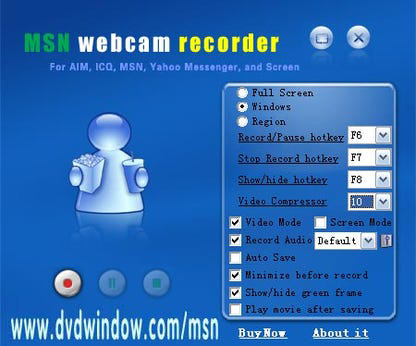
- Adaptive Recording Modes – The software supports full-screen recording, allowing users to capture every element of their desktop activity. This is ideal for recording webinars, online lectures, or full presentations where context and screen flow are essential.
- Window Recording – Users can select and record a specific application window, ensuring only relevant content is captured. This feature is especially useful for creating focused tutorials or documenting software workflows without including extraneous desktop elements.
- Fixed-Region Recording – This functionality enables the user to define a static screen area for recording, regardless of window changes. It’s highly effective for step-by-step guides or when maintaining a consistent webcam view during a recording session.
- Dynamic Video Compression – The software automatically detects and utilizes available video compressors on the system, optimizing recording performance based on hardware capabilities. This ensures a balance between high-quality output and manageable file sizes.
- Multi-source Audio Recording – Users can choose from multiple audio inputs, including microphone, line-in, and system audio (speakers). This flexibility ensures that commentary, interviews, or conversation audio is captured accurately alongside video.
- Clarity and Control – The app provides audio level adjustments and settings to maintain clear, distortion-free sound. This enhances the overall quality of recordings, making them suitable for sharing or archival purposes.
Each feature is designed to serve practical needs. For example, a teacher recording a lesson can use fixed-region mode to keep the webcam in view while switching between applications. A content creator might use window recording to demonstrate a software feature without showing the entire desktop. The combination of flexible recording modes and audio options makes this tool effective across diverse use cases.
Interface, UX & Performance
MSN Webcam Recorder 2016 features a clean, minimal interface that prioritizes accessibility. The layout is structured around core recording functions, with clearly labeled buttons for starting and stopping recordings, selecting recording modes, and managing audio sources. Navigation is straightforward, allowing users to switch between full-screen, window, and fixed-region recording with minimal effort. The visual design is functional rather than decorative, focusing on usability over aesthetics. Although the developer did not list formal performance metrics, the software’s 12.8 MB file size suggests a lightweight footprint, which typically correlates with efficient resource usage. It is expected to run smoothly on mid-range Windows systems, though specific hardware requirements were not disclosed. Responsiveness appears to be consistent based on the app’s real-time recording capabilities. Stability is implied by its continued availability and use since 2016, though no recent updates have been released. The lack of modern UI elements or touch support reflects its age, but it remains functional for basic recording tasks. Overall, the user experience is optimized for simplicity, making it suitable for users who value functionality over advanced customization.
Platform Compatibility & Technical Requirements
MSN Webcam Recorder 2016 is designed exclusively for the Windows platform. The software version is 2016, indicating it was released in August 2016. The file size is 12.8 MB, which is compact and suitable for quick downloads. The developer did not specify minimum OS requirements, nor did they list supported Windows versions (e.g., Windows 7, 10, or 11). Compatibility with modern Windows systems cannot be confirmed without additional information. However, the lightweight nature of the app increases the likelihood of it functioning on older systems. Users should exercise caution when installing on newer operating systems, as outdated software may face compatibility or security issues. No additional dependencies or runtime libraries were mentioned. The absence of a mobile or cross-platform version confirms that this tool is strictly a desktop utility for Windows users.
Pros and Cons
Pros
- Free to download and use, making it accessible to budget-conscious users.
- Supports multiple messaging platforms including MSN, AIM, ICQ, and Yahoo Messenger.
- Offers flexible recording modes: full-screen, window, and fixed-region.
- Dynamic compression adapts to system capabilities, balancing quality and file size.
- Multiple audio input options enhance recording versatility.
- Lightweight at 12.8 MB, suitable for older or low-resource systems.
Cons
- No recent updates since 2016, raising potential compatibility concerns with modern Windows versions.
- Developer did not disclose minimum OS or hardware requirements.
- Limited to Windows; no support for macOS, Android, or iOS.
- Outdated interface design may feel unfamiliar to newer users.
- No built-in video editing or sharing features.
- Security and privacy implications may exist due to lack of recent maintenance.
FAQ
Is MSN Webcam Recorder 2016 safe to download and install?
The software is available for free and was released in 2016. While it has been used by many users, the lack of recent updates may pose security risks on modern systems. It is recommended to scan the file with up-to-date antivirus software before installation.
Can I record video calls from MSN and other messaging apps?
Yes, the software is specifically designed to record live webcam sessions from MSN, AIM, ICQ, and Yahoo Messenger, as well as general screen activity.
Does the app support recording audio from my microphone and speakers?
Yes, MSN Webcam Recorder 2016 allows users to select audio sources such as microphone, line-in, or system audio (speakers) for synchronized recording.
Is the software compatible with Windows 10 and Windows 11?
Compatibility with newer Windows versions is not confirmed. While the lightweight design increases the likelihood of functionality, users may encounter issues due to outdated code and lack of updates.
Can I edit or share recordings directly from the app?
The software focuses solely on recording. No built-in editing tools or direct sharing options are available. Users must export the video file and use external software for editing or distribution.
Final Thoughts
MSN Webcam Recorder 2016 remains a functional tool for users seeking a straightforward, free solution to capture video calls and screen activity on Windows. Its support for multiple messaging platforms and flexible recording modes offers practical value, especially for those who need to document online interactions without advanced features. While its age and lack of updates are notable drawbacks, its lightweight design and core functionality still make it a viable option for basic recording needs. Users should be cautious about security and compatibility on modern systems. For individuals who prioritize simplicity and do not require editing or cloud integration, this app can still serve as a reliable utility. If you need to record MSN, AIM, ICQ, or Yahoo Messenger sessions—or capture specific screen content—this tool delivers on its promise. Download MSN Webcam Recorder 2016 now.
Guides & Tutorials for MSN Webcam Recorder 2016
How to install MSN Webcam Recorder 2016
- Click the Preview / Download button above.
- Once redirected, accept the terms and click Install.
- Wait for the MSN Webcam Recorder 2016 download to finish on your device.
How to use MSN Webcam Recorder 2016
This software is primarily used for its core features described above. Open the app after installation to explore its capabilities.
User Reviews for MSN Webcam Recorder 2016 0
No reviews found


